DEVELOPMENT CASE STUDY · EDUCATION & DIRECTORIES
AbroadPoint: Developing a Connected Study Abroad Discovery Platform
Choosing a course overseas means connecting several decisions: what to study, where to live, which institution to consider and how a qualification fits a future career. A useful education platform has to make those connections easy to follow.
AbroadPoint is Ninja Softs’ live study abroad discovery platform. We developed a connected experience that brings programme search, structured course information, destination guides, institution profiles and editorial resources into one WordPress website. The project demonstrates how we turn a large content catalogue into an organised product that people can explore through several routes.
Project at a glance
| Project | Development focus |
|---|---|
| Platform | AbroadPoint.com — international education discovery |
| Ninja Softs’ role | Platform development, catalogue experience and public content presentation; AbroadPoint is also operated and managed by Ninja Softs Pvt Ltd. |
| Audience | Prospective international students, education institutions, student ambassadors and contributors |
| Core experience | Multi-criteria programme search, detailed course pages and connected browsing by destination, institution, discipline and career |
| Technology | WordPress, Divi, Search & Filter integration and Contact Form 7 |
| Catalogue snapshot | 21 destination options, 44 institution options, 15 disciplines, 10 qualification types and 13 teaching-language options in the public search interface at the November 2026 review |
These figures describe public catalogue filter options at review. Teaching-language choices refer to courses.
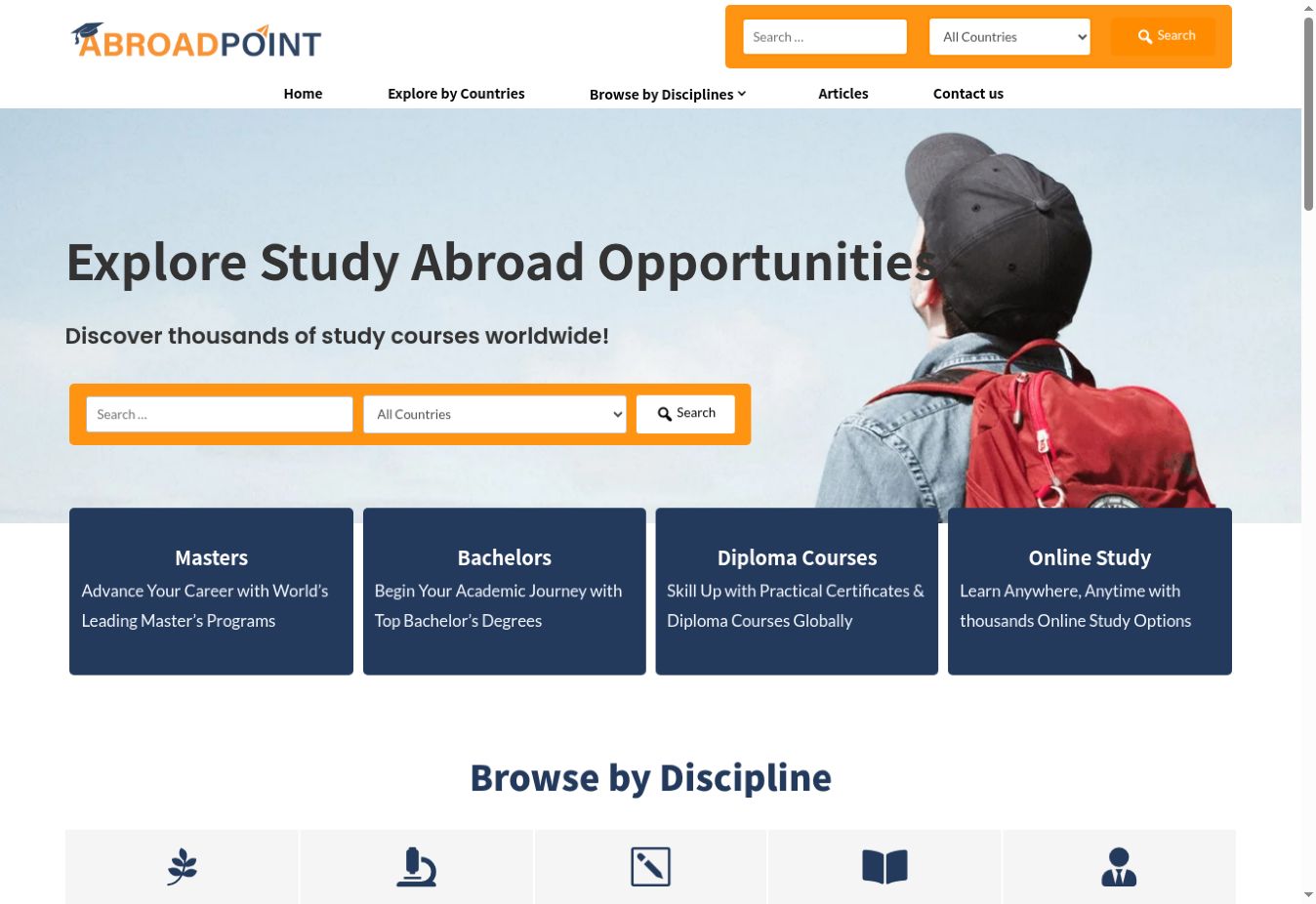
The live homepage introduces keyword and country search, with entry routes for master’s, bachelor’s, diploma and online study. Screenshot: 2 November 2026.
The challenge: make a varied education catalogue easy to explore
Education information is varied by nature. One programme might be a full-time master’s degree taught on campus; another might be an online qualification with a different duration, language and admission cycle. Students rarely begin with every preference decided.
The product challenge was to make that variety navigable while keeping individual records readable. A student interested in computing in Finland should be able to narrow the catalogue without reading unrelated programmes. Someone exploring a destination should be able to move from country guidance to relevant institutions and courses. A visitor who already knows a career direction needs another useful starting point.
Our development approach connects these journeys through shared content relationships. The catalogue, search controls and detail pages work as parts of the same discovery experience, with consistent labels and clear routes into deeper information.
A connected content model, with programmes at its centre
The programme record is the centre of AbroadPoint’s information architecture. Its surrounding attributes create useful groups that students can search, browse and revisit. A country, discipline or institution is both a piece of information on a course page and a route to a wider collection.
This is where development starts to affect the usefulness of a directory. Shared classifications connect the content across different views. The same destination can appear in a search filter, on a programme page and as a guide with its own catalogue. The public experience reflects a taxonomy-based structure rather than a collection of disconnected landing pages.
| Content relationship | What it makes possible |
|---|---|
| Country and city | Browse by destination, move into local context and return to related programmes. |
| Institution | Connect a course to its provider’s public profile and other listed programmes. |
| Discipline and qualification | Explore a subject area or narrow the catalogue to a particular level of study. |
| Teaching language, study format and delivery mode | Refine practical preferences such as English-taught, full-time or online study. |
| Career pathway | Move from a course into related professional directions and their programme archives. |
For an education directory, this architecture supports additional records and categories without requiring an individually designed page for every course. The maintenance discipline is equally important: course details, classifications and provider links must remain accurate as the catalogue changes.
Advanced search that follows the student’s decision process
AbroadPoint gives visitors a quick keyword-and-country search from the homepage and a more detailed search interface for refining results. The advanced view brings together keyword search, qualification, teaching language, study format, delivery mode, discipline, country and institution. Sorting controls offer relevance, recently updated and study-duration choices.
The controls display result-aware counts and preserve selected criteria. Results use a repeated card pattern with a programme title, introductory text, institution, destination and qualification or delivery labels. Pagination keeps the longer result sets divided into manageable pages.
A concrete discovery journey
In our review, combining master’s degree + Computer Science & IT + Finland returned 17 matching programmes across two pages. The selected criteria remained visible. A separate search for Cyber Security in Finland returned one matching University of Turku programme. These examples show the filters working together to answer different levels of intent.
The main selections are represented in the search URL, so a filtered collection can be revisited through its address. Homepage routes, such as Online Study, lead directly into the corresponding filtered catalogue. This connects the simpler entry experience to the deeper search system.
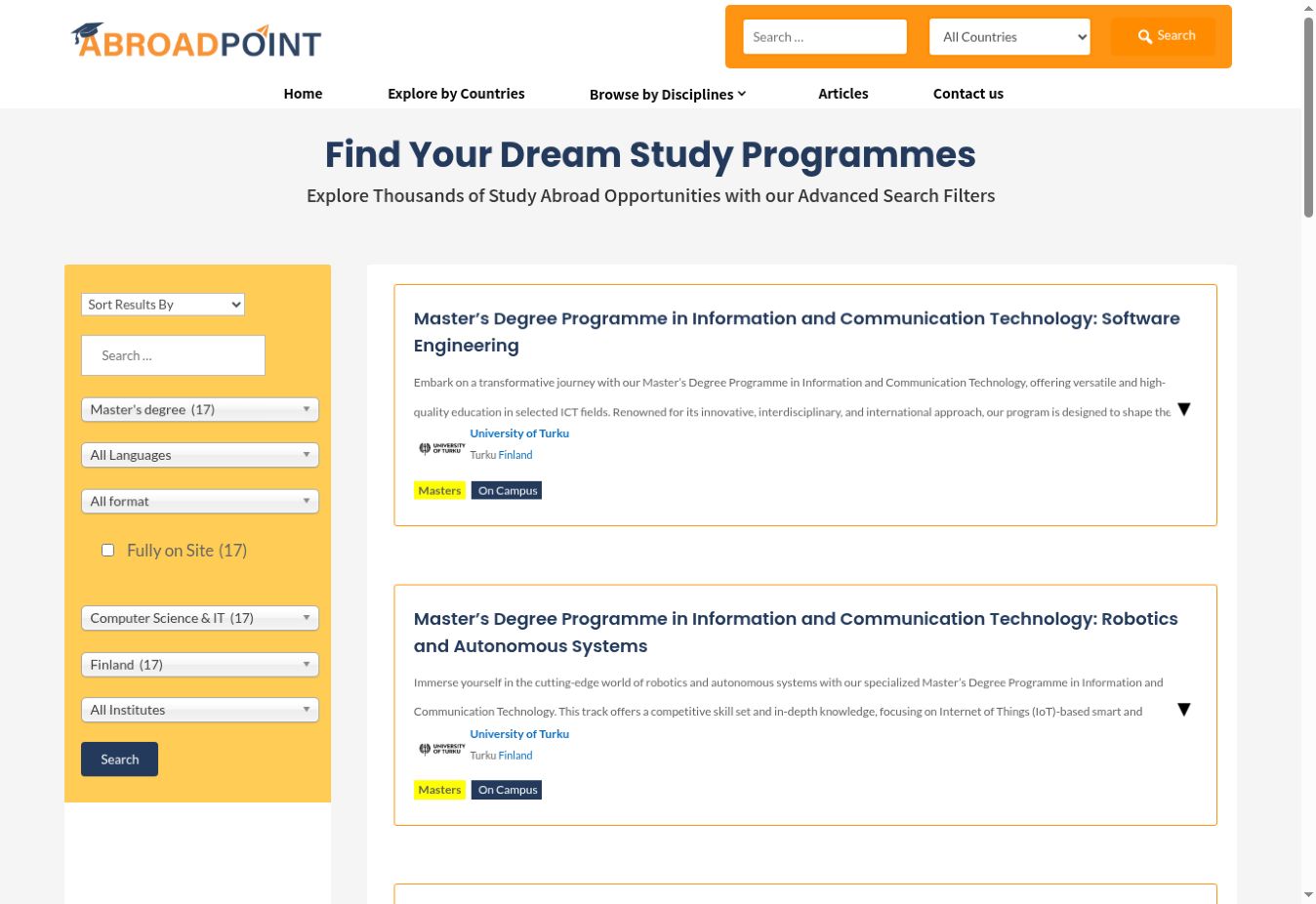
The filtered search combines qualification, discipline and destination. The 17-match example was checked in the live interface in November 2026; counts will change as the catalogue is updated.
Reusable programme pages for information-heavy content
A useful result card earns the next click; the detail page then has to organise a much larger amount of information. AbroadPoint’s programme layout groups the essentials first: title, institution, qualification, discipline, location, admission session, study format and delivery mode. A separate summary highlights duration, scholarship indication and teaching language.
The longer material is organised into Overview, Admission Requirements, Program Structure, Tuition Fee and Career Outcomes tabs. In the reviewed LUT University programme, changing the selected tab displayed the corresponding programme content. This keeps the information grouped by the question a visitor is trying to answer.
From a development perspective, the value is the reusable presentation pattern. Courses share the same information hierarchy, while their content changes by record. That consistency makes the catalogue easier to scan and gives editors a common structure to maintain.
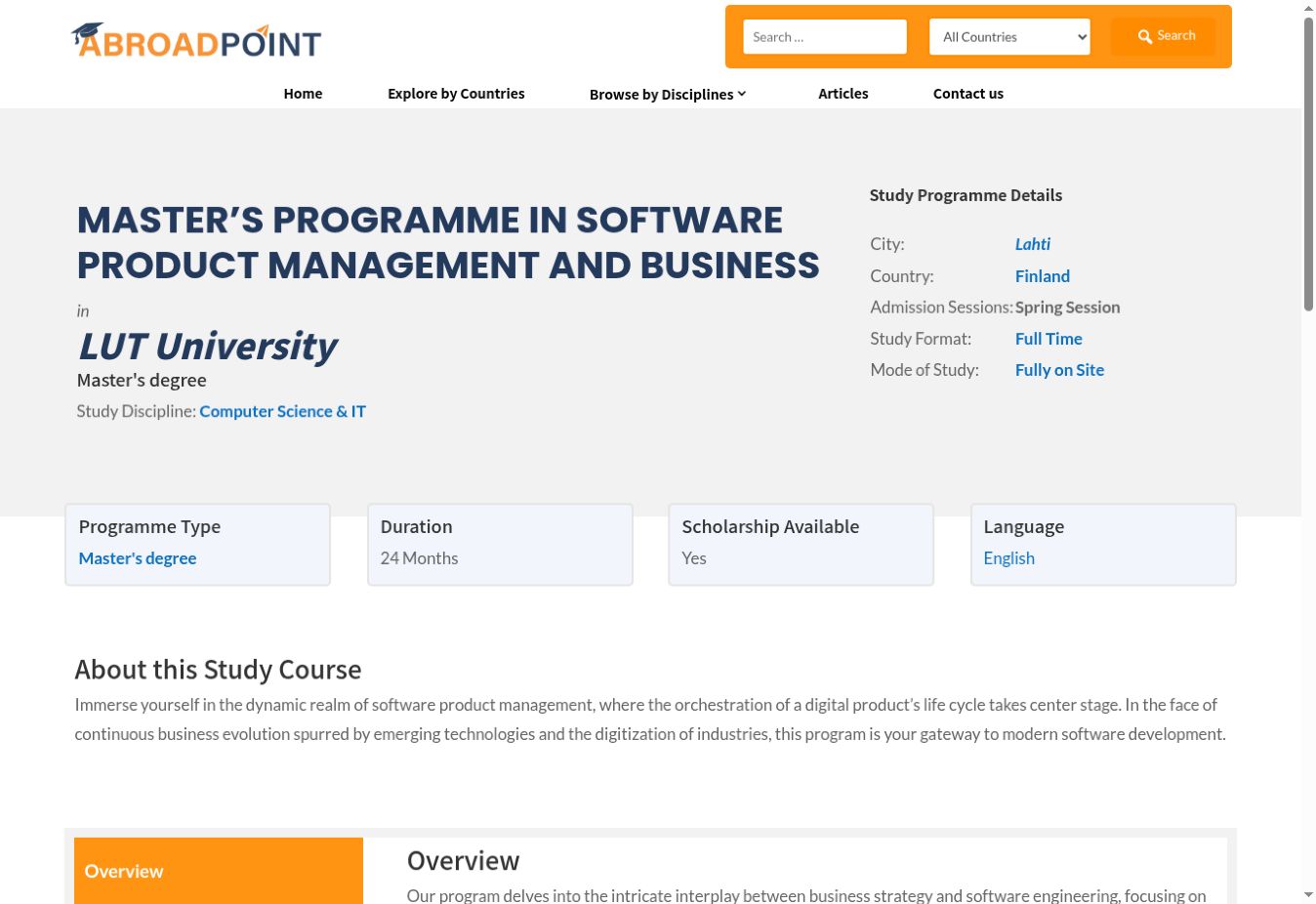
A consistent programme layout brings institution, location, study mode, duration, scholarship indication and teaching language into one overview. Screenshot: 2 November 2026.
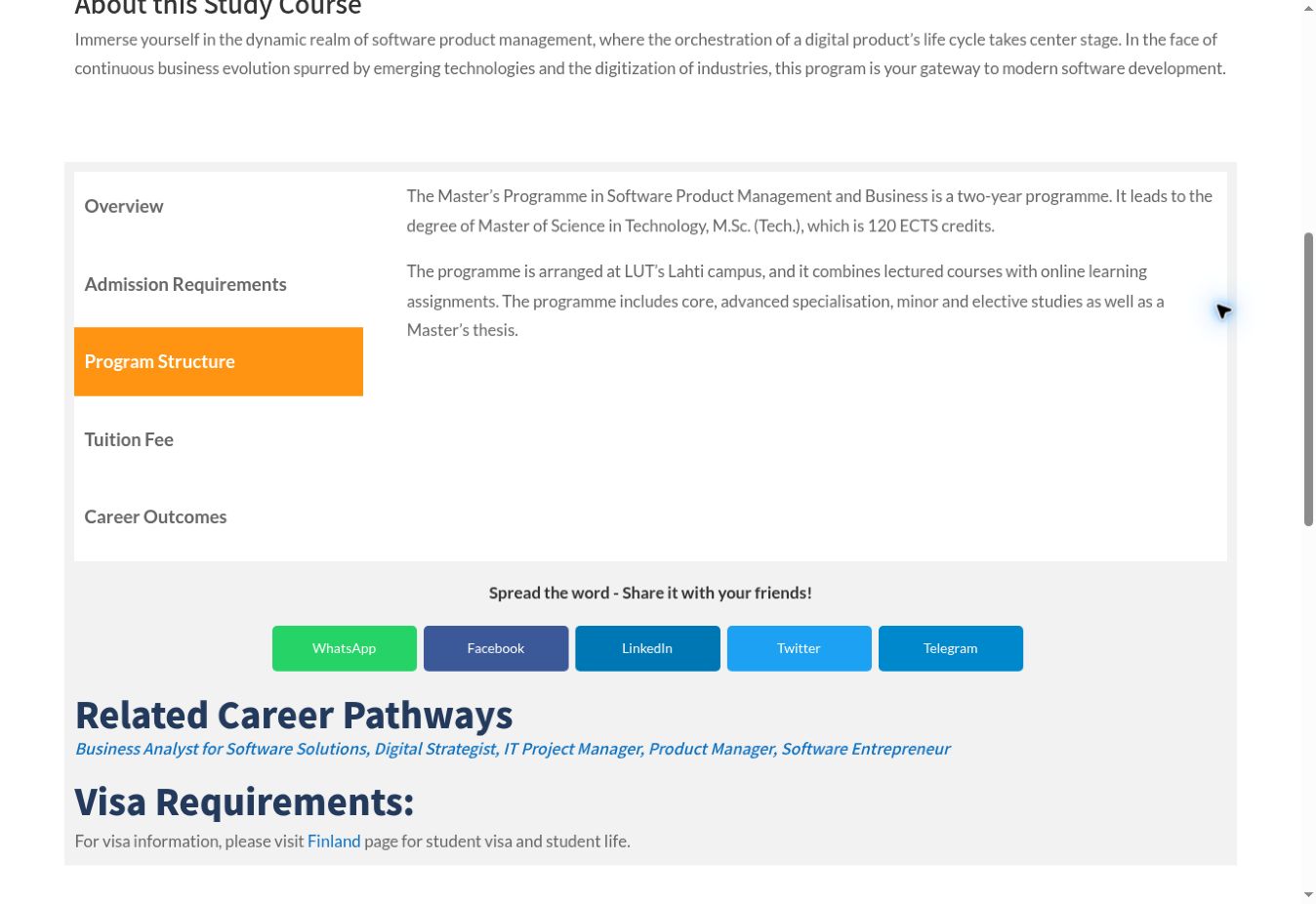
The selected Program Structure tab, social-sharing controls, related career pathways and the destination-guide handoff. Screenshot: 2 November 2026.
Programme pages also connect visitors to career-pathway archives and country guidance. Official provider links are available where populated, giving users a route to check the source institution. These links help people continue their research beyond the catalogue.
Country, institution and career pages extend the journey
Students need context around a course. AbroadPoint’s country pages combine destination guidance with programme listings and institution links. The Finland guide, for example, brings education, student life, costs, funding, work and visa topics into the same browsing journey as the catalogue.
Institution profiles provide another entry point, with provider information and programme listings. Discipline, city, qualification, language, study-format and delivery-mode archives create further ways to explore. Career-pathway pages connect academic options to possible professional directions.
The development lesson is that an archive can be a useful destination in its own right. A meaningful heading, supporting information and connected listings give visitors a reason to keep exploring. These relationships also create descriptive internal links between relevant areas of the website.
Editorial content and forms for distinct audiences
The platform combines structured catalogue content with an article library for broader study-abroad research. Reviewed articles include author and date information, a table of contents, section navigation and internal links. Editorial material gives visitors useful guidance before they have chosen a specific programme.
Different contributors also need different ways to contact the platform. AbroadPoint provides dedicated public forms rather than asking every audience to send the same generic enquiry:
| Audience route | Information captured by the public form |
|---|---|
| Add your institute | Contact details, location, representative role, website, programme categories, accreditation or registration information, motivation and consent. |
| Student ambassador programme | Applicant details, home country, institution, study level, course, motivation and consent. |
| Write for us | Contributor details, proposed topics, previous-publication information, draft-file upload and editorial acceptance. |
| Contact us | Name, email, phone and a general message. |
The contributor form offers Word document uploads with a stated 5 MB limit. Institution applications are presented as a staff-reviewed onboarding route. Each form gives its audience a relevant starting point and gathers information for the platform team to review.
The technology and development expertise behind the experience
AbroadPoint demonstrates how an established content platform can support a specialist directory when its content relationships, templates and integrations are brought together carefully.
| Technology layer | Its role in the visible experience |
|---|---|
| WordPress | The publishing foundation for programme content, public archives, guides and articles. |
| Divi | Page and template presentation, programme content tabs and the general contact form. |
| Search & Filter integration | The multi-criteria programme-discovery interface and filtered result collections. |
| Contact Form 7 | The public institution, ambassador and contributor submission forms. |
Content architecture before decoration
The relationships between programmes, institutions, destinations and careers carry the product. Clear classifications allow the same content to serve search, archive and detail views. This is a practical example of our ability to translate a specialist information domain into a navigable web experience.
Reusable templates with consistent information hierarchy
Programme facts, content tabs and repeated result cards keep presentation consistent across many records. Template-led development reduces the need to manage each page as a separate design and makes future presentation changes easier to apply coherently.
Integration and interaction design
The homepage search, advanced filters, selected state, result cards and pagination form one journey. Bringing those pieces together requires attention to how the visitor enters, refines and leaves a result set. The project shows our experience integrating WordPress tools into a domain-specific product.
Maintainability as part of the product
A growing directory needs both a repeatable layout and dependable content. Shared templates provide a common presentation, while clear field responsibilities and catalogue review remain important operating practices. Our approach to projects like this includes planning how records, links and classifications will be maintained after launch.
For businesses evaluating ‘+link(‘/wordpress-website-development/’,’WordPress development’)+’, AbroadPoint provides a concrete example of structured publishing and catalogue interaction. It also illustrates the kinds of content and workflow requirements we assess when deciding whether a project fits WordPress or needs ‘+link(‘/custom-software-development/’,’custom software development’)+’.
What the live platform demonstrates
The clearest outcomes in this case study are the working capabilities people can use on the live platform:
- Refine discovery: combine practical study criteria and browse paginated programme matches.
- Understand a programme: inspect key study facts and move between grouped detail sections.
- Follow context: move between courses, institutions, destinations, disciplines and career pathways.
- Research more broadly: use destination guides and editorial resources alongside the catalogue.
- Choose a relevant contact route: find institution, ambassador, contributor and general-enquiry forms.
The search combinations and programme-tab interaction were exercised during the public-site review. Forms were inspected without submitting applications. The figures in this article describe catalogue options and observed search matches; they are not traffic, conversion, admissions or revenue results.
AbroadPoint demonstrates Ninja Softs’ ability to develop a substantial content-led platform with structured records, connected navigation and purposeful interactions. The same development principles apply to education directories, service catalogues and other information-rich websites where visitors need to find the right item within a broad collection.
Planning an education portal, directory or catalogue?
If your project has a growing catalogue, several content types or a complex discovery journey, the first step is to define the records, relationships and tasks the website needs to support. We can help turn those requirements into a practical development scope, from content architecture and interface design to WordPress implementation or a custom application.
Explore our web development services or view more of our work.
Explore the project: Programme search · Country guide · Programme example · Institution enquiry · Platform ownership
Project review and screenshots: 1–2 November 2026. This article describes the live public experience at that time. Catalogue counts, study information and available programmes may change.